Exporting System Information
You can export system information report in the following formats:
- HTML
- MS Excel
- MS Word
- Rich Text Format
To export system information, follow these steps:
- Go to Application Menu > Data Catalog > Metadata Manager.
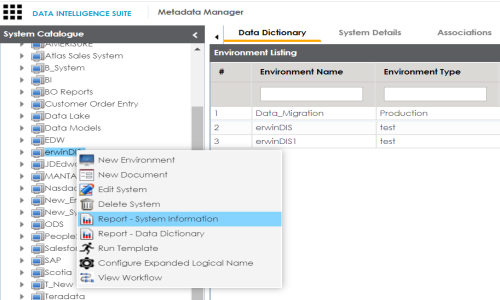
- Under the System Catalogue pane, right-click the desired system.
- Click Report - System Information.
- Use the following options:
- Select System
- You can select a system to generate its System Information Report.
- Export to HTML (
 )
)- To export the system information report in HTML format, click
.- Export to PDF (
 )
)- To export the system information report in PDF format, click
.- Export to Excel (
 )
)- To export the system information report in .xlsx format, click
.- Export to Word (
 )
)- To export the system information report in .docx format, click
.- Export to RTF (
 )
)- To export the system information report in .rtf format, click
.
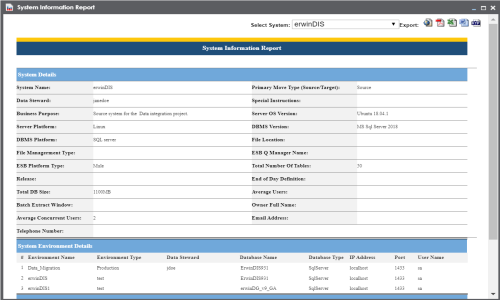
The System Information Report page appears displaying, System Details, System Environment details, and System Document Details.
|
Copyright © 2020 erwin, Inc.
All rights reserved.
|
|